
 Sign in to Mod The Sims
 Round Clothed Curvy Set - new meshes, new functions for dining room
 Round Clothed Curvy Set - new meshes, new functions for dining room
MTS has all free content, all the time. Donate to help keep it running.
SCREENSHOTS




img_RCCsetJasana_thumbnail.jpg - width=800 height=493
img_RCCsetJasana_cherrylilac.jpg - width=800 height=600
img_RCCsetJasana_silverlace.jpg - width=800 height=600
img_RCCsetJasana_maplefloral.jpg - width=800 height=600
img_RCCsetJasana_cabinet_examine.jpg - width=700 height=700
img_RCCsetJasana_buffetfood_closeup.jpg - width=800 height=600
img_RCCsetJasana_teaset_havecup.jpg - width=700 height=700
Picked Upload!
This is a picked upload! It showcases some of the best talent and creativity available on MTS and in the community.

Uploaded: 22nd Feb 2007 at 8:23 AM
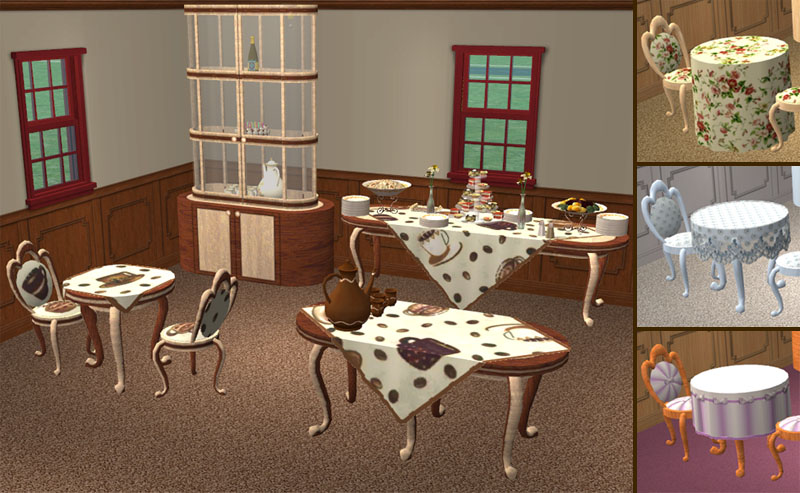
Sorry, I'm no good with nice names  so this set name simply reflects the shapes used. It started from round clothed tables, and expanded with more items to fill a dining room. Hope you'll like it
The set includes:
- dining tables, sized 1x1, 2x1 and 3x1
- dining chair
- buffet table, with 3 new meals and 2 plates for them
- dish cabinet, with 3 shelves and new interaction
- tea set and tea cup
Object dependencies.Note that buffet table requires 3x1 table presence (it borrows recolors from it), and all foods and plates, to work correctly. Tea set requires tea cup to work properly. All other objects are independent.
Objects were created in base game and should work with all addons.
Object features.
1. Dining tables have alpha-editable cloth. unlike my square tables, texture mapping for these is completely independent and non-overlapping, so you can play with it however you like - even make it square, as in one of recolors
2. Chair has nothing special.
3. Buffet table has:
- 2 decorative slots where you can put any vases (more presizely, anything placeable on end table) you like - forget about the same boring flowers all the time
- 3 new dishes, properly animated on table and on plates - meat, salad and pastry; due to my laziness those dishes are available from this buffet table only, they can't be cooked like other meals
4. Dish cabinet:
- has 3 slots of 'end table' type (anything placeable on end tables will fit)
- is animated - doors can be opened and closed (and you'll need to open doors to interact with objects on shelves, since cabinet glass is not click-transparent)
- has new Fun-raising interaction 'What's on shelves?' - sim looks at objects on eash shelf and thinks of them, as you can see on screenshot
5. Tea set:
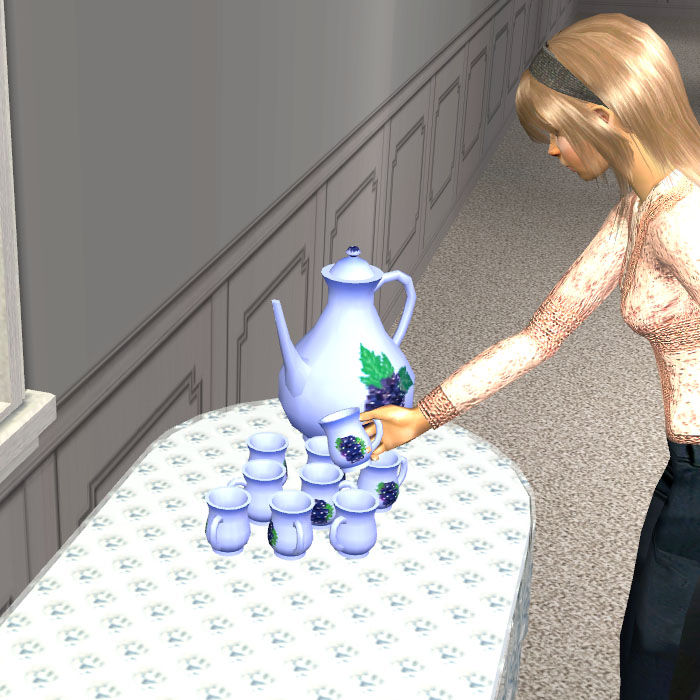
- can be placed on any surface, but due to this, it has no pouring animation (since all pouring animations I know require counter height) - sim just grabs a cup from set
- is recolorable, and cup automatically inherits current recolor when grabbed
- becomes spoiled in 12 hours after preparation (with the same effect as on buffet table) - don't forget to clean it up
- cup doesn't raise Energy - it's tea, not coffee
- usable by children as well - animations look a bit worse for them then for adults, but at least you can have all family enjoying tea together now
Recolors.
All recolors are stored in the same package as their meshes - sorry, just didn't want to end with too many packages
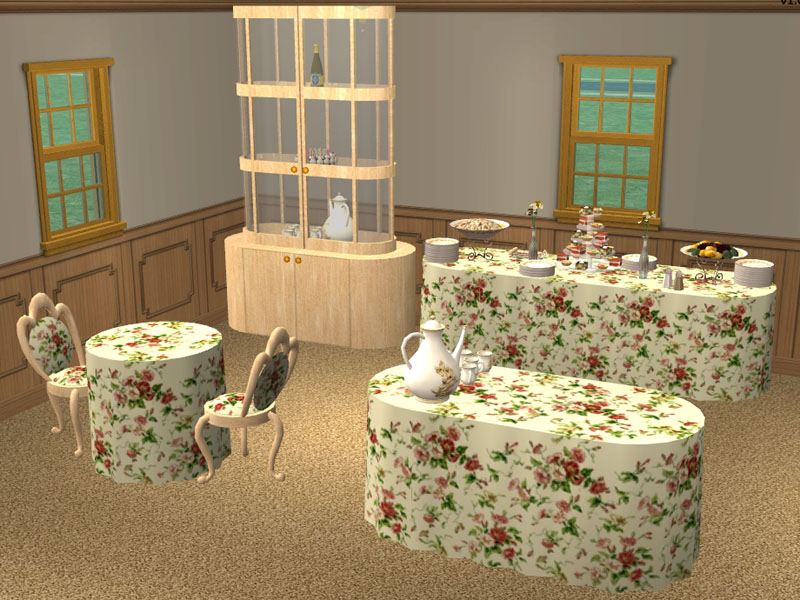
All tables have 2 recolorable subsets - 'table' and 'cloth'. 'table' has 4 recolors - maple, cherry, wood mix (dark and light) and metallic. 'cloth' has 5 recolors - invisible (set as default, to make 'table' subset recolors visible on thumbnails), floral (full length), lilac with shorter folds, square-shaped, white with lace.
Chair has 2 recolorable subsets - 'wood', with the same recolors as 'table' in tables, and 'cloth', with the same recolors (except invisible) as 'cloth' in tables.
Cabinet has 2 recolorable subsets - 'wood', with the same recolors as 'table' in tables, and 'glass', with 1 default glass recolor.
Teaset has 1 recolorable subset, 'porcelain', with 4 recolors - white with gold patterns, blue with grape patterns, lilac, and brown.
Technical details.
Mesh geometry:
- cabinet - 1588 vertices, 1240 faces total
- chair - 658 vertices, 1008 faces total
- table 1x1 - 602 vertices, 762 faces total
- table 2x1 - 926 vertices, 1268 faces total
- table 3x1 - 1010 vertices, 1340 faces total
- buffet table - 4908 vertices, 4905 faces total
- both dinner and dessert plates - 72 vertices, 68 faces for plate subset (repeated in 2 GMDCs)
- meat dish - 312 vertices, 254 faces for plateless GMDC (repeated in additional GMDC with a copy of plate)
- salad dish - 177 vertices, 156 faces for plateless GMDC (repeated in additional GMDC with a copy of plate)
- pastry dish - 250 vertices, 212 faces for plateless GMDC (repeated in additional GMDC with a copy of plate)
- tea set - 3510 vertices, 5134 faces
- tea cup - 386 vertices, 564 faces
Dishes and buffet table are animated via ChangeMaterial.
Cabinet was cloned from armoire and re-coded.
Tea set was cloned from coffeemaker, but its functionality is more like buffet table.
Thanks.
To skankyboy, for the smd plugin.
To fisheeyes, for explaining how to add slots to objects.
To Peter Jones, for PJSE plugins.
To modthesims2 in general, for tons of valuable information
Policy.
Feel free to recolor my objects, but don't post them as donation or pay items, and don't forget to credit me properly.
Ask for permission if you want to clone my object.
You may use my creations in your houses, if they are posted on a free site. (The Exchange doesn't count as free site, if anyone doubts.)
Please don't redistribute my objects - give link to the thread where you got them instead.
 so this set name simply reflects the shapes used. It started from round clothed tables, and expanded with more items to fill a dining room. Hope you'll like it
The set includes:
- dining tables, sized 1x1, 2x1 and 3x1
- dining chair
- buffet table, with 3 new meals and 2 plates for them
- dish cabinet, with 3 shelves and new interaction
- tea set and tea cup
Object dependencies.Note that buffet table requires 3x1 table presence (it borrows recolors from it), and all foods and plates, to work correctly. Tea set requires tea cup to work properly. All other objects are independent.
Objects were created in base game and should work with all addons.
Object features.
1. Dining tables have alpha-editable cloth. unlike my square tables, texture mapping for these is completely independent and non-overlapping, so you can play with it however you like - even make it square, as in one of recolors
2. Chair has nothing special.
3. Buffet table has:
- 2 decorative slots where you can put any vases (more presizely, anything placeable on end table) you like - forget about the same boring flowers all the time
- 3 new dishes, properly animated on table and on plates - meat, salad and pastry; due to my laziness
 those dishes are available from this buffet table only, they can't be cooked like other meals
4. Dish cabinet:
- has 3 slots of 'end table' type (anything placeable on end tables will fit)
- is animated - doors can be opened and closed (and you'll need to open doors to interact with objects on shelves, since cabinet glass is not click-transparent)
- has new Fun-raising interaction 'What's on shelves?' - sim looks at objects on eash shelf and thinks of them, as you can see on screenshot
5. Tea set:
- can be placed on any surface, but due to this, it has no pouring animation (since all pouring animations I know require counter height) - sim just grabs a cup from set
- is recolorable, and cup automatically inherits current recolor when grabbed
- becomes spoiled in 12 hours after preparation (with the same effect as on buffet table) - don't forget to clean it up
- cup doesn't raise Energy - it's tea, not coffee
- usable by children as well - animations look a bit worse for them then for adults, but at least you can have all family enjoying tea together now
Recolors.
All recolors are stored in the same package as their meshes - sorry, just didn't want to end with too many packages
All tables have 2 recolorable subsets - 'table' and 'cloth'. 'table' has 4 recolors - maple, cherry, wood mix (dark and light) and metallic. 'cloth' has 5 recolors - invisible (set as default, to make 'table' subset recolors visible on thumbnails), floral (full length), lilac with shorter folds, square-shaped, white with lace.
Chair has 2 recolorable subsets - 'wood', with the same recolors as 'table' in tables, and 'cloth', with the same recolors (except invisible) as 'cloth' in tables.
Cabinet has 2 recolorable subsets - 'wood', with the same recolors as 'table' in tables, and 'glass', with 1 default glass recolor.
Teaset has 1 recolorable subset, 'porcelain', with 4 recolors - white with gold patterns, blue with grape patterns, lilac, and brown.
Technical details.
Mesh geometry:
- cabinet - 1588 vertices, 1240 faces total
- chair - 658 vertices, 1008 faces total
- table 1x1 - 602 vertices, 762 faces total
- table 2x1 - 926 vertices, 1268 faces total
- table 3x1 - 1010 vertices, 1340 faces total
- buffet table - 4908 vertices, 4905 faces total
- both dinner and dessert plates - 72 vertices, 68 faces for plate subset (repeated in 2 GMDCs)
- meat dish - 312 vertices, 254 faces for plateless GMDC (repeated in additional GMDC with a copy of plate)
- salad dish - 177 vertices, 156 faces for plateless GMDC (repeated in additional GMDC with a copy of plate)
- pastry dish - 250 vertices, 212 faces for plateless GMDC (repeated in additional GMDC with a copy of plate)
- tea set - 3510 vertices, 5134 faces
- tea cup - 386 vertices, 564 faces
Dishes and buffet table are animated via ChangeMaterial.
Cabinet was cloned from armoire and re-coded.
Tea set was cloned from coffeemaker, but its functionality is more like buffet table.
Thanks.
To skankyboy, for the smd plugin.
To fisheeyes, for explaining how to add slots to objects.
To Peter Jones, for PJSE plugins.
To modthesims2 in general, for tons of valuable information
Policy.
Feel free to recolor my objects, but don't post them as donation or pay items, and don't forget to credit me properly.
Ask for permission if you want to clone my object.
You may use my creations in your houses, if they are posted on a free site. (The Exchange doesn't count as free site, if anyone doubts.)
Please don't redistribute my objects - give link to the thread where you got them instead.
This is a new mesh, and means that it's a brand new self contained object that usually does not require a specific Pack (although this is possible depending on the type). It may have Recolours hosted on MTS - check below for more information.
| Filename | Size | Downloads | Date | |||||
|
obj_RCCsetJasana_teaset.rar
Size: 117.6 KB · Downloads: 13,935 · 22nd Feb 2007 |
117.6 KB | 13,935 | 22nd Feb 2007 | |||||
|
obj_RCCsetJasana_table3x1.rar
Size: 146.5 KB · Downloads: 12,281 · 22nd Feb 2007 |
146.5 KB | 12,281 | 22nd Feb 2007 | |||||
|
obj_RCCsetJasana_table2x1.rar
Size: 124.6 KB · Downloads: 12,542 · 22nd Feb 2007 |
124.6 KB | 12,542 | 22nd Feb 2007 | |||||
|
obj_RCCsetJasana_table1x1.rar
Size: 91.8 KB · Downloads: 12,939 · 22nd Feb 2007 |
91.8 KB | 12,939 | 22nd Feb 2007 | |||||
|
obj_RCCsetJasana_chair.rar
Size: 74.3 KB · Downloads: 13,214 · 22nd Feb 2007 |
74.3 KB | 13,214 | 22nd Feb 2007 | |||||
|
obj_RCCsetJasana_cabinet.rar
Size: 142.1 KB · Downloads: 13,197 · 22nd Feb 2007 |
142.1 KB | 13,197 | 22nd Feb 2007 | |||||
|
obj_RCCsetJasana_buffettable.rar
Size: 461.7 KB · Downloads: 13,664 · 22nd Feb 2007 |
461.7 KB | 13,664 | 22nd Feb 2007 | |||||
| For a detailed look at individual files, see the Information tab. | ||||||||
Key:
- - File was updated after upload was posted
Install Instructions
Basic Download and Install Instructions:
1. Download: Click the download link to save the .rar or .zip file(s) to your computer.
2. Extract the zip, rar, or 7z file.
3. Place in Downloads Folder: Cut and paste the .package file(s) into your Downloads folder:
1. Download: Click the download link to save the .rar or .zip file(s) to your computer.
2. Extract the zip, rar, or 7z file.
3. Place in Downloads Folder: Cut and paste the .package file(s) into your Downloads folder:
- Origin (Ultimate Collection): Users\(Current User Account)\Documents\EA Games\The Sims™ 2 Ultimate Collection\Downloads\
- Non-Origin, Windows Vista/7/8/10: Users\(Current User Account)\Documents\EA Games\The Sims 2\Downloads\
- Non-Origin, Windows XP: Documents and Settings\(Current User Account)\My Documents\EA Games\The Sims 2\Downloads\
- Mac: Users\(Current User Account)\Documents\EA Games\The Sims 2\Downloads
- Mac x64: /Library/Containers/com.aspyr.sims2.appstore/Data/Library/Application Support/Aspyr/The Sims 2/Downloads
- For a full, complete guide to downloading complete with pictures and more information, see: Game Help: Downloading for Fracking Idiots.
- Custom content not showing up in the game? See: Game Help: Getting Custom Content to Show Up.
- If you don't have a Downloads folder, just make one. See instructions at: Game Help: No Downloads Folder.
Also Thanked - Users who thanked this download also thanked:
My Policy
General rule - if it's not for free, then it's not allowed.
Feel free to recolor my objects/clothing meshes, but don't post them as donation or pay items, and don't forget to credit me properly.
Ask for permission if you want to clone my object/mesh. I'm likely to give permission if result is going to be free.
You may use my creations in your sims/houses, and include them to upload, if they are posted as free items. Please give link to the thread where you got them - for bugreporting and updates.
Please don't upload my stuff to Exchange.
I do not take requests - I have more unfinished projects and ideas then the time to complete them :(
--------------------------------
For Russian-speaking downloaders - если у вас есть жалобы по работе моих объектов, оставляйте их здесь, пожалуйста. Я не могу исправить ошибки, если я о них не знаю ;)
Feel free to recolor my objects/clothing meshes, but don't post them as donation or pay items, and don't forget to credit me properly.
Ask for permission if you want to clone my object/mesh. I'm likely to give permission if result is going to be free.
You may use my creations in your sims/houses, and include them to upload, if they are posted as free items. Please give link to the thread where you got them - for bugreporting and updates.
Please don't upload my stuff to Exchange.
I do not take requests - I have more unfinished projects and ideas then the time to complete them :(
--------------------------------
For Russian-speaking downloaders - если у вас есть жалобы по работе моих объектов, оставляйте их здесь, пожалуйста. Я не могу исправить ошибки, если я о них не знаю ;)
More Downloads BETA
Here are some more of my downloads: