
 Sign in to Mod The Sims
 GlassWood Bathroom Set
 GlassWood Bathroom Set
MTS has all free content, all the time. Donate to help keep it running.
SCREENSHOTS




GWBSmain.jpg - width=800 height=807
GWBS1.JPG - width=800 height=807
GWBS2.jpg - width=800 height=807
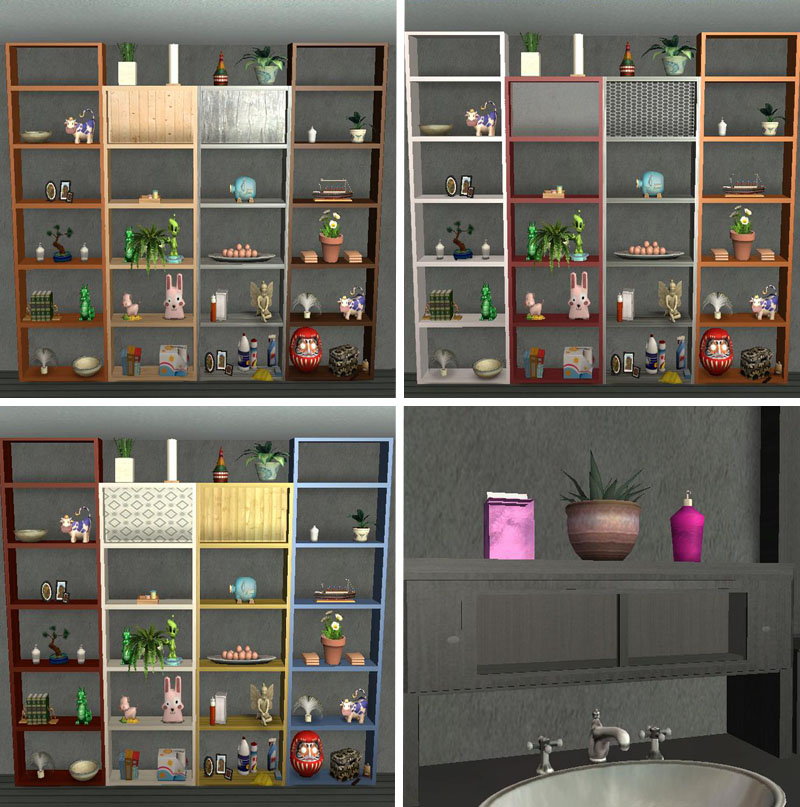
All the divider slots; sink shelf.
GWBS4.JPG - width=800 height=807
GWBS5.JPG - width=800 height=807
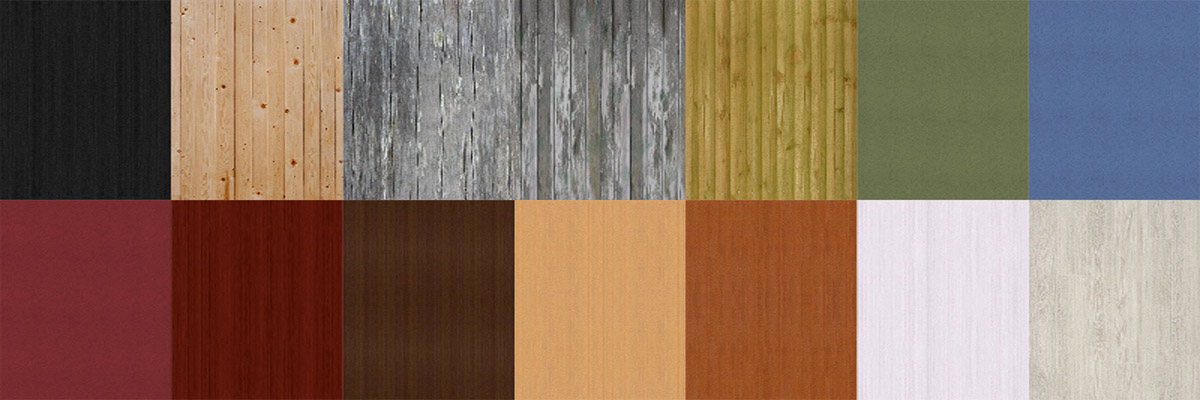
GWBSwoodrecolors.jpg - width=1200 height=400
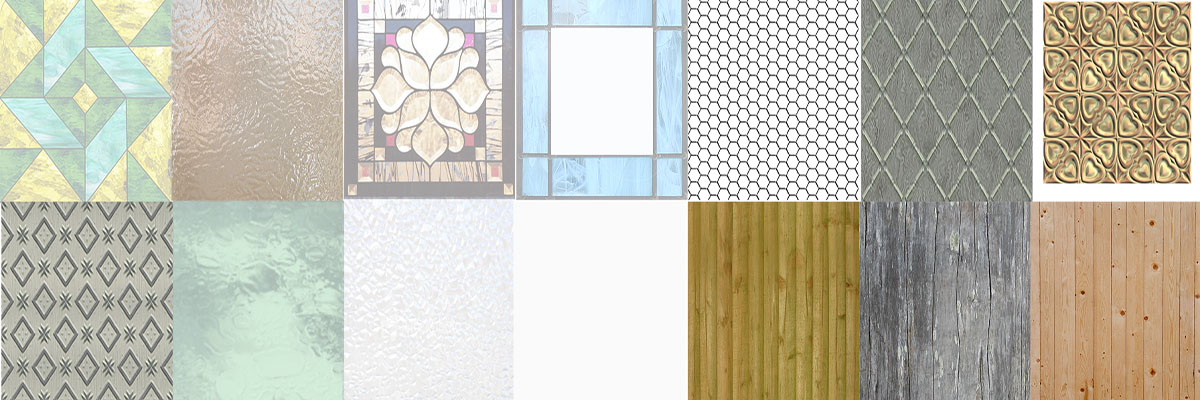
GWBSglassrecolors.JPG - width=1200 height=400
GWBS3.jpg - width=800 height=807
Picked Upload!
This is a picked upload! It showcases some of the best talent and creativity available on MTS and in the community.

Created by mustluvcatz
Uploaded: 7th Aug 2010 at 5:27 PM
Updated: 18th Sep 2010 at 7:59 AM - slight edit; added collection file
Updated: 18th Sep 2010 at 7:59 AM - slight edit; added collection file
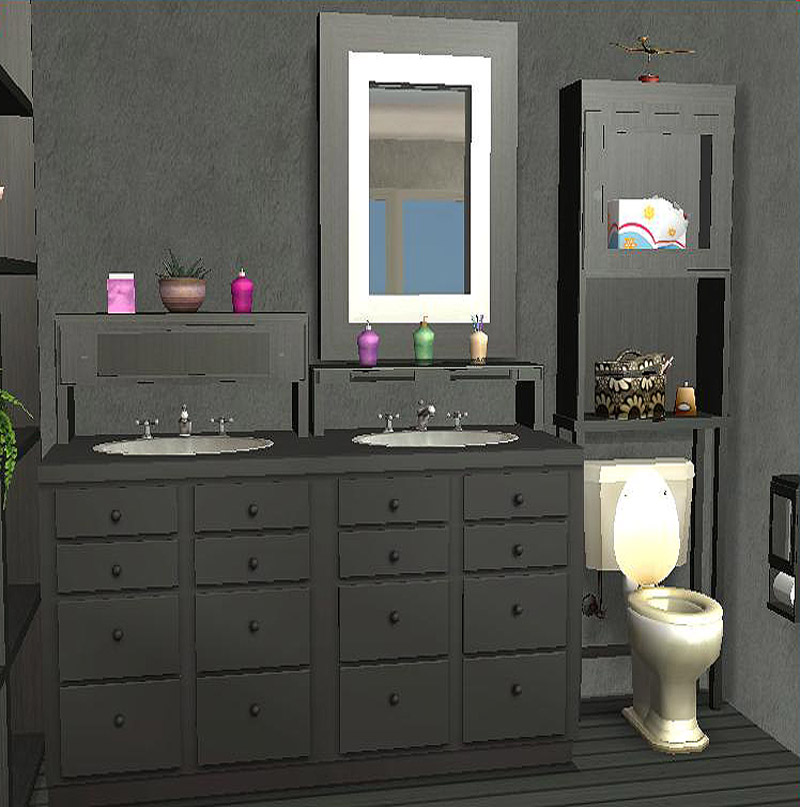
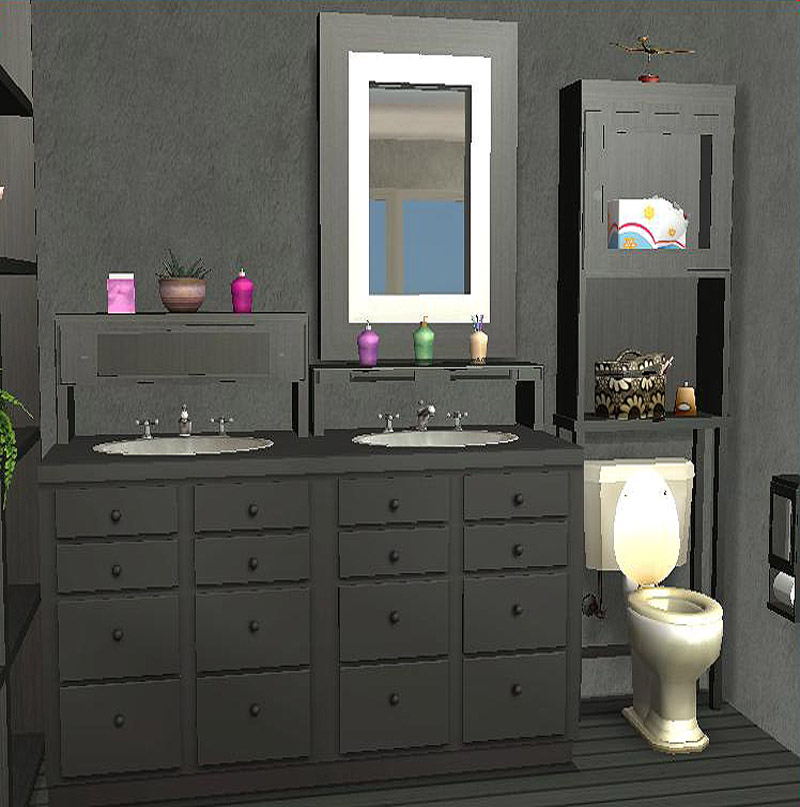
Introducing the GlassWood Bathroom Set- 15 new meshes to beautify your Sims' bathrooms. Don't let the name fool you though- many of these pieces can be used in other rooms.
What you get: Bathroom Shelf, Wall Shelf, Short Divider/Shelf, Tall Divider/Shelf, Low Over-The-Sink Shelf, High Over-The-Sink Shelf, Hanging Towel Rack and towels for it, Toilet Paper Holder, 4 columns, a hamper and a mirror. There are also plenty of recolors- 13 in all for each item.
The particulars:
 The BATHROOM SHELF is the MASTER and holds all the recolors for everything EXCEPT the hamper, mirror and hanging towels. It is needed in game for all but those 3 meshes to work. The files are clearly named to make it easy to delete any slave meshes you might not want.
The hamper and mirror are separate objects with their own recolors due to the glass. The hamper didn't look right with the glass, the mirror didn't look right with transparent glass in the frame.
The shelves and the towel rack all have slots! See pics. Use "M" to cycle through them in game. NOTE: For the sink shelves- it's easier to place one on the ground (in the air actually), place deco on the slots THEN place the shelf over a sink.
The wall shelf and towel rack are not shiftable. The mirror is if you have Apartment Life.
The tall divider/shelf does not have glass in the top shelf- the short one does (no slots on that shelf because of the glass!). Also, the very top shelf of the tall divider/shelf does not have slots. You can use OMSP's to place objects on that shelf.
The hanging towels are not slaved to the in-game towels. They're placed on the footprint to match up with the rod on the towel rack. They will shift up and down if you have Apartment Life, but the towel rack DOES not shift.
The tall divider and tall columns are all ceiling height.
NOTES ABOUT THE COLUMNS:
There are 4 columns, 2 tall and 2 short of each kind - 2 are very slim and 2 are pretty much regular columns. All of them are placed in the footprint to match up to the side of the divider/shelves. The slim ones can be used to hide the wall if you put a divider up against a wall because the wall eats it. The regular columns are meant to fill up the empty space left if you want to arranage the divider/shelves in a pattern- like an "L" shape. You will have to use "boolprop snapobjectstogrid false" to place a divider at another angle. (See pics and if you have any questions, feel free to ask. I'm not the greatest at explaining this stuff!) The "setquartertileplacement on" cheat won't work to place another divider properly.
Buy Mode Catalog Placement and Price:
Bathroom Shelf 350, Short Divider 275, Tall Divider 300, Low Sink Shelf 175, High Sink Shelf 200, Towel Rack 225, Wall Shelf 275: Surfaces>Shelves; Mirror 175 Deco>Mirrors; Hanging Towels 100, Toilet Paper Holder 25: Deco>Wall; All 4 Columns 10, Build>Misc; Hamper, 150, Deco>Sculptures.
All objects should be base game. Any problems, please let me know. Feel free to recolor- the UV Map for the glass is available to show where the knob is on it. (The knobs take their color from the glass.) If you want it, let me know.
Content used in screenshots is by: Plastic Box (plants), Guatla (tub, toilet and some deco), Cameranutz 11 (small fairy), Buggybooz (counter, bowl), Maxis/EAxis and myself.
 Residential Collection File added.
Deco Set HERE
Polygon Counts:
Hanging Towels - f408 v279 (Maxis, edited by me)
Mirror - f116 v232
Tall Column - f12 v24
Short Shelf Divider - f164 v272
Tall Shelf Divider - f 164 v272
Sink Shelf - f 346 v667
Slim Short Column - f12 v24
Slim Tall Column - f 12 v24
Small Sink Shelf - f346 v574
Towel Rack - f 532 v743
Toilet Paper Holder - f 776 v982
Wall Shelf - f 420 v659
Short Column - f12 v24
Hamper - f358 v567
Additional Credits:
SimPE, MilkShape, PhotoShop, CEP
What you get: Bathroom Shelf, Wall Shelf, Short Divider/Shelf, Tall Divider/Shelf, Low Over-The-Sink Shelf, High Over-The-Sink Shelf, Hanging Towel Rack and towels for it, Toilet Paper Holder, 4 columns, a hamper and a mirror. There are also plenty of recolors- 13 in all for each item.
The particulars:
 The BATHROOM SHELF is the MASTER and holds all the recolors for everything EXCEPT the hamper, mirror and hanging towels. It is needed in game for all but those 3 meshes to work. The files are clearly named to make it easy to delete any slave meshes you might not want. The hamper and mirror are separate objects with their own recolors due to the glass. The hamper didn't look right with the glass, the mirror didn't look right with transparent glass in the frame. The shelves and the towel rack all have slots! See pics. Use "M" to cycle through them in game. NOTE: For the sink shelves- it's easier to place one on the ground (in the air actually), place deco on the slots THEN place the shelf over a sink. The wall shelf and towel rack are not shiftable. The mirror is if you have Apartment Life. The tall divider/shelf does not have glass in the top shelf- the short one does (no slots on that shelf because of the glass!). Also, the very top shelf of the tall divider/shelf does not have slots. You can use OMSP's to place objects on that shelf. The hanging towels are not slaved to the in-game towels. They're placed on the footprint to match up with the rod on the towel rack. They will shift up and down if you have Apartment Life, but the towel rack DOES not shift. The tall divider and tall columns are all ceiling height.
NOTES ABOUT THE COLUMNS:
There are 4 columns, 2 tall and 2 short of each kind - 2 are very slim and 2 are pretty much regular columns. All of them are placed in the footprint to match up to the side of the divider/shelves. The slim ones can be used to hide the wall if you put a divider up against a wall because the wall eats it.
 The regular columns are meant to fill up the empty space left if you want to arranage the divider/shelves in a pattern- like an "L" shape. You will have to use "boolprop snapobjectstogrid false" to place a divider at another angle. (See pics and if you have any questions, feel free to ask. I'm not the greatest at explaining this stuff!) The "setquartertileplacement on" cheat won't work to place another divider properly.
Buy Mode Catalog Placement and Price:
Bathroom Shelf 350, Short Divider 275, Tall Divider 300, Low Sink Shelf 175, High Sink Shelf 200, Towel Rack 225, Wall Shelf 275: Surfaces>Shelves; Mirror 175 Deco>Mirrors; Hanging Towels 100, Toilet Paper Holder 25: Deco>Wall; All 4 Columns 10, Build>Misc; Hamper, 150, Deco>Sculptures.
All objects should be base game. Any problems, please let me know. Feel free to recolor- the UV Map for the glass is available to show where the knob is on it. (The knobs take their color from the glass.) If you want it, let me know.
Content used in screenshots is by: Plastic Box (plants), Guatla (tub, toilet and some deco), Cameranutz 11 (small fairy), Buggybooz (counter, bowl), Maxis/EAxis and myself.
 Residential Collection File added. Deco Set HERE
 Polygon Counts:
Hanging Towels - f408 v279 (Maxis, edited by me)
Mirror - f116 v232
Tall Column - f12 v24
Short Shelf Divider - f164 v272
Tall Shelf Divider - f 164 v272
Sink Shelf - f 346 v667
Slim Short Column - f12 v24
Slim Tall Column - f 12 v24
Small Sink Shelf - f346 v574
Towel Rack - f 532 v743
Toilet Paper Holder - f 776 v982
Wall Shelf - f 420 v659
Short Column - f12 v24
Hamper - f358 v567
Additional Credits:
SimPE, MilkShape, PhotoShop, CEP
This is a new mesh, and means that it's a brand new self contained object that usually does not require a specific Pack (although this is possible depending on the type). It may have Recolours hosted on MTS - check below for more information.
| Filename | Size | Downloads | Date | |||||
|
MLC-ResidentialCollectionFile.rar
| Residential Collection File
Size: 3.8 KB · Downloads: 33,728 · 7th Aug 2010 |
3.8 KB | 33,728 | 7th Aug 2010 | |||||
|
MLC-HangingTowelsANDRecolors.rar
| Hanging Towels and all towel recolors.
Size: 135.7 KB · Downloads: 34,513 · 7th Aug 2010 |
135.7 KB | 34,513 | 7th Aug 2010 | |||||
|
MLC-MirrorANDRecolors.rar
| Mirror and all mirror recolors.
Size: 828.2 KB · Downloads: 34,474 · 7th Aug 2010 |
828.2 KB | 34,474 | 7th Aug 2010 | |||||
|
MLC-HamperANDRecolors.rar
| Hamper and all hamper recolors.
Size: 639.9 KB · Downloads: 34,555 · 7th Aug 2010 |
639.9 KB | 34,555 | 7th Aug 2010 | |||||
|
MLC-GlassWoodBathroomSet-SLAVEMeshes.rar
| The slave meshes- no recolors.
Size: 129.1 KB · Downloads: 35,460 · 7th Aug 2010 |
129.1 KB | 35,460 | 7th Aug 2010 | |||||
|
MLC-BathroomShelf-MASTERmeshANDRecolors.rar
| The master mesh and all recolors.
Size: 792.1 KB · Downloads: 41,682 · 7th Aug 2010 |
792.1 KB | 41,682 | 7th Aug 2010 | |||||
| For a detailed look at individual files, see the Information tab. | ||||||||
Key:
- - File was updated after upload was posted
Install Instructions
Basic Download and Install Instructions:
1. Download: Click the download link to save the .rar or .zip file(s) to your computer.
2. Extract the zip, rar, or 7z file.
3. Place in Downloads Folder: Cut and paste the .package file(s) into your Downloads folder:
1. Download: Click the download link to save the .rar or .zip file(s) to your computer.
2. Extract the zip, rar, or 7z file.
3. Place in Downloads Folder: Cut and paste the .package file(s) into your Downloads folder:
- Origin (Ultimate Collection): Users\(Current User Account)\Documents\EA Games\The Sims™ 2 Ultimate Collection\Downloads\
- Non-Origin, Windows Vista/7/8/10: Users\(Current User Account)\Documents\EA Games\The Sims 2\Downloads\
- Non-Origin, Windows XP: Documents and Settings\(Current User Account)\My Documents\EA Games\The Sims 2\Downloads\
- Mac: Users\(Current User Account)\Documents\EA Games\The Sims 2\Downloads
- Mac x64: /Library/Containers/com.aspyr.sims2.appstore/Data/Library/Application Support/Aspyr/The Sims 2/Downloads
- For a full, complete guide to downloading complete with pictures and more information, see: Game Help: Downloading for Fracking Idiots.
- Custom content not showing up in the game? See: Game Help: Getting Custom Content to Show Up.
- If you don't have a Downloads folder, just make one. See instructions at: Game Help: No Downloads Folder.
Also Thanked - Users who thanked this download also thanked:
Terms Of Use
Feel free to clone/modify/recolor/convert my meshes. Meshes and recolors can be included with lots. The only thing I ask is that you DO NOT include my meshes/recolors in Adfly links or make money from them in any other way. ALSO: Please don't include any of my downloads in a big all-in-one download. You know how people upload their downloads folder for others to download. Yeah, please don't include my stuff in one of those. Thanks in advance. :)
The exception: My TS4 Robert Williamson sim. I would really like it if he's not edited in any way. He's my tribute to Robin Williams, who was someone I greatly admired. Changing him would make him just another sim.
The exception: My TS4 Robert Williamson sim. I would really like it if he's not edited in any way. He's my tribute to Robin Williams, who was someone I greatly admired. Changing him would make him just another sim.