
 Sign in to Mod The Sims
 Milk Bottle Apartment Door Model Changer
 Milk Bottle Apartment Door Model Changer
MTS has all free content, all the time. Donate to help keep it running.
SCREENSHOTS


collage.jpg - width=624 height=416
Colours.jpg - width=283 height=176
known issues collage copy.jpg - width=567 height=493
pie menu collage copy.jpg - width=567 height=403
bottle-as-Hero-copy.jpg - width=425 height=670
Featured Upload!
This is a featured upload! It showcases the best talent and creativity available on MTS and in the community. 



Created by leefish
Uploaded: 7th Dec 2008 at 12:55 AM
Updated: 23rd Jul 2013 at 9:35 PM - Added clarification regarding deletion of bottle after use
Updated: 23rd Jul 2013 at 9:35 PM - Added clarification regarding deletion of bottle after use
When apartment life first came out I was looking forward to making streets of houses with multiple families - I was disappointed to learn that the Apartment Door was hardcoded into the game and no other door could be used for Apartments. With the help of Inge Jones from simlogical and Tunaisafish of MTS2 I have created an object mod that makes different models of doors possible. Ladies and gentlemen, I bring you -
THE MAGIC MILKBOTTLE!!!
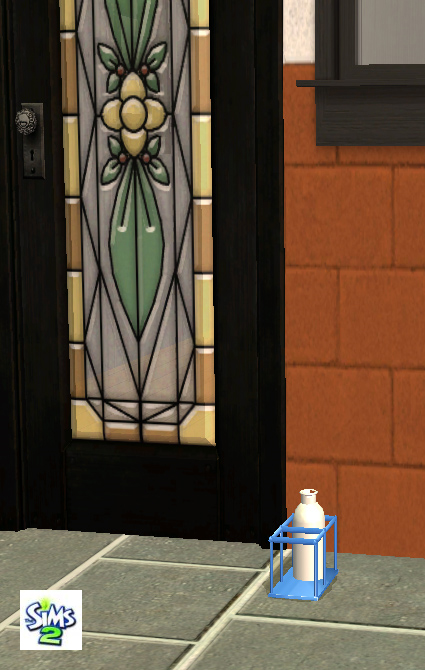
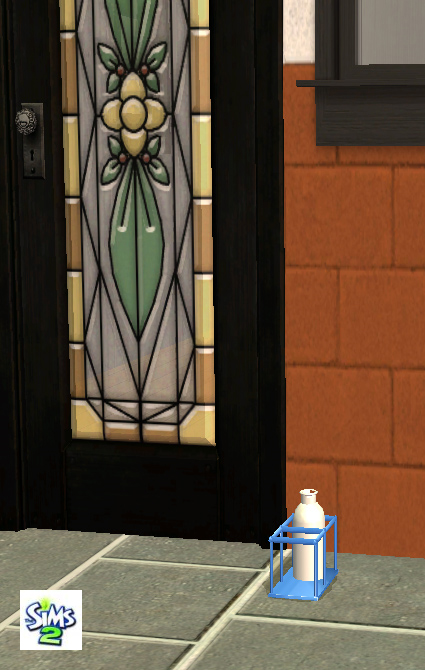
This milk bottle in its cute (recolourable) holder combined with the door clones in this package makes it possible to use other door types as Apartment Doors. This can be used on existing apartments - see end of post. This has been fully playtested by Tunaisafish, Ingeli and myself (and various other testers who did not report back.....grrr).
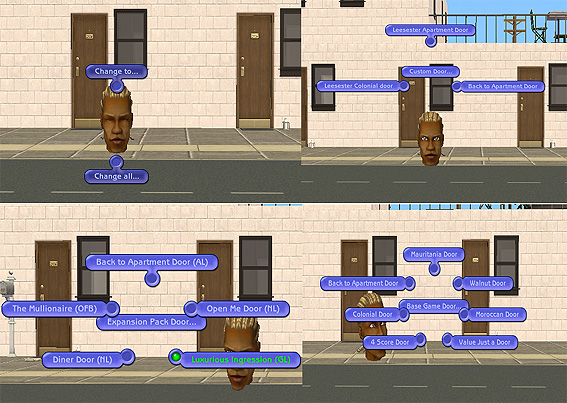
The object requires a Sim to activate the milk bottle - see the pie menus in the picture below.
Which doors do you get?
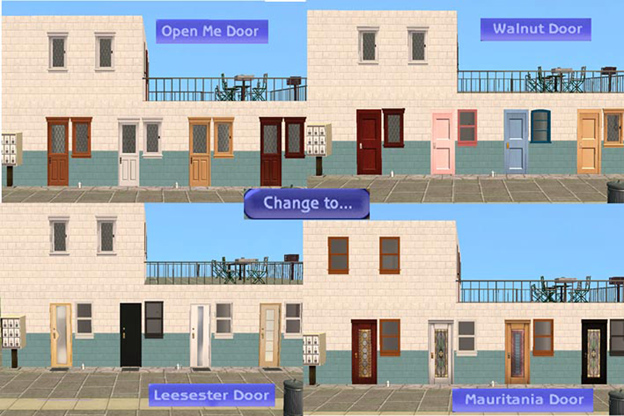
You get up to 12 different doors - if you have all the EPs in the bottle. you DEFINITELY get 8 doors as below:
Mauritania Door, Walnut Door, Value Justa Door, 4 Score door, Colonial Interior Door, Moroccan Door, Leesester Apartment Door (with mat!) and Leesester Colonial Glass Door
Just click on the bottle and one of 2 options appears. Change to or change all - change to works one door at a time, change all will change all the doors on the lot. If you want to change ALL doors on the lot you can put the bottle anywhere, click on "change all" and follow the pie menu. If you want to change just one door put the bottle next to the door you want to change and click on "change to" and follow the pie menu. This means you can have different models of door on your apartment lot all at the same time! Of course, all of these doors are fully recolourable (repository technique doors) and will pick up any recolours of the original doors that you have in your downloads folder.
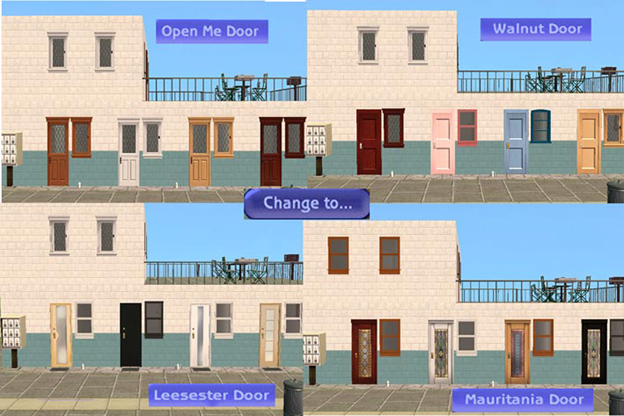
In the requirements for the object I said that this mod only requires Apartment Life to work; this is true but in order to see the Expansion Pack doors in game you do have to have a copy of the appropriate EP installed. In the menu for the Expansion pack doors next to the Door name is the required EP;
OFB = Open for Business
NL = Nightlife
GL = Glamour Life
USING THE BOTTLE
You will find the bottle under decorative/sculptures at the reasonable price of 1 simoleon. Please be aware that you need a sim on the lot to change the doors. As you know, when you move a sim out of a furnished residential lot then all your furniture moves with it, so you can EITHER do the door design before you furnish OR use Inge's Stay Things Shrub from Simlogical OR use one of the apartment building cheats. Once a lot has been zoned as an apartment lot then your sim can use the milk bottle to recolour/redesign all the doors on the lot. Once all the doors have been changed, you can delete the milk bottle and the change will stay.
HOW TO APPLY THE REMODELLING TO YOUR EXISTING APARTMENTS
press ctrl+shift+c and type
boolprop testingcheatsenabled true
boolprop aptsublotspecifictoolsdisabled false
Place the bottle by any of the apartment doors and change them at will
press ctrl+shift+c and type
boolprop aptsublotspecifictoolsdisabled true
boolprop testingcheatsenabled false
ADDING DOORS
If you have a request to add a custom door to the Milk Bottle then I will try to help you by maintaining updates to this bottle but please be aware that
1) you must make the door yourself and it must have the same size wallmask as the Apartment Door
2) your door must be a repository door
3) your door must have already been accepted as upload to MTS2/be based on a Maxis EP door
Therefore I cannot add doors which are significantly different in size (double doors) or doors which are not repository doors (which will prevent EP copyright issues).
POLYS
The bottle has 679 polygons, all doors have the same polys as Maxis and will not show in your game as buyable items.
CREATOR POLICY
for this item ONLY I ask that you do not include it in lots as all the doors etc are required for this to work properly; however, a milkbottle lot will survive upload and download with the doorchange intact with no bottle on the lot if you leave the door clone in the package. If you decide to use this item for an uploaded lot in the description of the lot please mention this thread to download the bottle in your upload post so your downloaders can get different doors. The lot will still work fine even if the downloaders decide not to get the bottle.
Additional Credits:
Inge Jones for letting me use her forum, Tunaisafish for suggesting the one by one changer and testing, Ingeli for testing and Numenor for rejecting the first version of this mod as this version is a LOT better than the first, and, as always, SimPE.
THE MAGIC MILKBOTTLE!!!
This milk bottle in its cute (recolourable) holder combined with the door clones in this package makes it possible to use other door types as Apartment Doors. This can be used on existing apartments - see end of post. This has been fully playtested by Tunaisafish, Ingeli and myself (and various other testers who did not report back.....grrr).
The object requires a Sim to activate the milk bottle - see the pie menus in the picture below.
Which doors do you get?
You get up to 12 different doors - if you have all the EPs in the bottle. you DEFINITELY get 8 doors as below:
Mauritania Door, Walnut Door, Value Justa Door, 4 Score door, Colonial Interior Door, Moroccan Door, Leesester Apartment Door (with mat!) and Leesester Colonial Glass Door
Just click on the bottle and one of 2 options appears. Change to or change all - change to works one door at a time, change all will change all the doors on the lot. If you want to change ALL doors on the lot you can put the bottle anywhere, click on "change all" and follow the pie menu. If you want to change just one door put the bottle next to the door you want to change and click on "change to" and follow the pie menu. This means you can have different models of door on your apartment lot all at the same time! Of course, all of these doors are fully recolourable (repository technique doors) and will pick up any recolours of the original doors that you have in your downloads folder.
In the requirements for the object I said that this mod only requires Apartment Life to work; this is true but in order to see the Expansion Pack doors in game you do have to have a copy of the appropriate EP installed. In the menu for the Expansion pack doors next to the Door name is the required EP;
OFB = Open for Business
NL = Nightlife
GL = Glamour Life
Known Issues
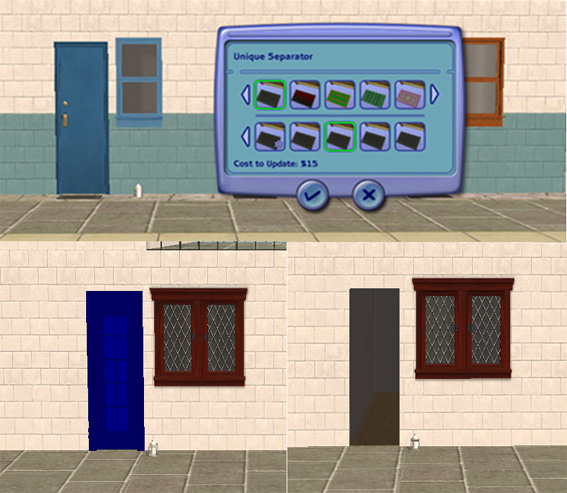
While using the bottle there are a couple of known issues; see below. The recolourable options thumbnail displays as if this is an apartment door, but the normal recolours are still there. If you get either a flashing blue object or a hole in the wall this is because you tried to use an expansion pack door for an EP you do not have installed.
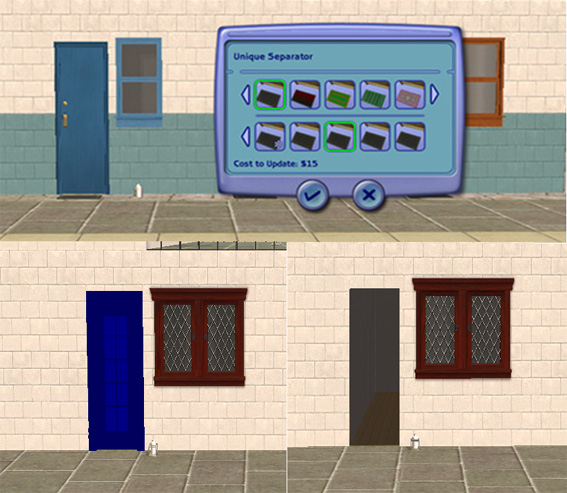
While using the bottle there are a couple of known issues; see below. The recolourable options thumbnail displays as if this is an apartment door, but the normal recolours are still there. If you get either a flashing blue object or a hole in the wall this is because you tried to use an expansion pack door for an EP you do not have installed.
USING THE BOTTLE
You will find the bottle under decorative/sculptures at the reasonable price of 1 simoleon. Please be aware that you need a sim on the lot to change the doors. As you know, when you move a sim out of a furnished residential lot then all your furniture moves with it, so you can EITHER do the door design before you furnish OR use Inge's Stay Things Shrub from Simlogical OR use one of the apartment building cheats. Once a lot has been zoned as an apartment lot then your sim can use the milk bottle to recolour/redesign all the doors on the lot. Once all the doors have been changed, you can delete the milk bottle and the change will stay.
HOW TO APPLY THE REMODELLING TO YOUR EXISTING APARTMENTS
press ctrl+shift+c and type
boolprop testingcheatsenabled true
boolprop aptsublotspecifictoolsdisabled false
Place the bottle by any of the apartment doors and change them at will
press ctrl+shift+c and type
boolprop aptsublotspecifictoolsdisabled true
boolprop testingcheatsenabled false
ADDING DOORS
If you have a request to add a custom door to the Milk Bottle then I will try to help you by maintaining updates to this bottle but please be aware that
1) you must make the door yourself and it must have the same size wallmask as the Apartment Door
2) your door must be a repository door
3) your door must have already been accepted as upload to MTS2/be based on a Maxis EP door
Therefore I cannot add doors which are significantly different in size (double doors) or doors which are not repository doors (which will prevent EP copyright issues).
POLYS
The bottle has 679 polygons, all doors have the same polys as Maxis and will not show in your game as buyable items.
CREATOR POLICY
for this item ONLY I ask that you do not include it in lots as all the doors etc are required for this to work properly; however, a milkbottle lot will survive upload and download with the doorchange intact with no bottle on the lot if you leave the door clone in the package. If you decide to use this item for an uploaded lot in the description of the lot please mention this thread to download the bottle in your upload post so your downloaders can get different doors. The lot will still work fine even if the downloaders decide not to get the bottle.
Additional Credits:
Inge Jones for letting me use her forum, Tunaisafish for suggesting the one by one changer and testing, Ingeli for testing and Numenor for rejecting the first version of this mod as this version is a LOT better than the first, and, as always, SimPE.
| Filename | Size | Downloads | Date | |||||
|
Milk Bottle upload.rar
Size: 364.9 KB · Downloads: 13,794 · 7th Dec 2008 |
364.9 KB | 13,794 | 7th Dec 2008 | |||||
| For a detailed look at individual files, see the Information tab. | ||||||||
Key:
- - File was updated after upload was posted
Install Instructions
Basic Download and Install Instructions:
1. Download: Click the download link to save the .rar or .zip file(s) to your computer.
2. Extract the zip, rar, or 7z file.
3. Place in Downloads Folder: Cut and paste the .package file(s) into your Downloads folder:
1. Download: Click the download link to save the .rar or .zip file(s) to your computer.
2. Extract the zip, rar, or 7z file.
3. Place in Downloads Folder: Cut and paste the .package file(s) into your Downloads folder:
- Origin (Ultimate Collection): Users\(Current User Account)\Documents\EA Games\The Sims™ 2 Ultimate Collection\Downloads\
- Non-Origin, Windows Vista/7/8/10: Users\(Current User Account)\Documents\EA Games\The Sims 2\Downloads\
- Non-Origin, Windows XP: Documents and Settings\(Current User Account)\My Documents\EA Games\The Sims 2\Downloads\
- Mac: Users\(Current User Account)\Documents\EA Games\The Sims 2\Downloads
- Mac x64: /Library/Containers/com.aspyr.sims2.appstore/Data/Library/Application Support/Aspyr/The Sims 2/Downloads
- For a full, complete guide to downloading complete with pictures and more information, see: Game Help: Downloading for Fracking Idiots.
- Custom content not showing up in the game? See: Game Help: Getting Custom Content to Show Up.
- If you don't have a Downloads folder, just make one. See instructions at: Game Help: No Downloads Folder.
Recommended
The creator also recommends the following uploads:
Also Thanked - Users who thanked this download also thanked:
by Nopke
Packs Needed
Other Information
Type:
– Object Mods
: Object Interaction Mods (things that change how sims interact with objects or their environment, like "Multi-owner door" or "sunbathe anywhere")
Tags
#Apartments, #Maxis Match, #Doors, #Mod
Packs Needed
| Base Game | |
|---|---|
 | Sims 2 |
| Expansion Pack | |
|---|---|
 | Apartment Life |
About me
Welcome to my Profile Page
In addition to all the things I have uploaded to MTS I also have a site of my own, leefish.nl. We have free downloads from various creators and accept Sims related uploads from members. Click on the link below to visit the site.
www.leefish.nl
Extra Policy Information
Please feel free to use my meshes in your lots as long as you give me credit for it and please do not share elsewhere as your own work.
The only exception to my policy for uploading with lots is the milk bottle door changer, which should not be uploaded in a lot.
Feel free to include any of my meshes in mesh packs etc in your uploads EXCEPT for on Pay Sites.
If you use my items I would love to know about it, but you don't have to tell me if you don't want to.
In addition to all the things I have uploaded to MTS I also have a site of my own, leefish.nl. We have free downloads from various creators and accept Sims related uploads from members. Click on the link below to visit the site.
www.leefish.nl
Extra Policy Information
Please feel free to use my meshes in your lots as long as you give me credit for it and please do not share elsewhere as your own work.
The only exception to my policy for uploading with lots is the milk bottle door changer, which should not be uploaded in a lot.
Feel free to include any of my meshes in mesh packs etc in your uploads EXCEPT for on Pay Sites.
If you use my items I would love to know about it, but you don't have to tell me if you don't want to.
More Downloads BETA
Here are some more of my downloads: