|
1624 Comments / Replies (Who?)
- 1427 Feedback Posts,
197 Thanks Posts
Hide Thanks Posts for this thread (Show only feedback) |
|
|
#301 |
| FordGT90Concept |
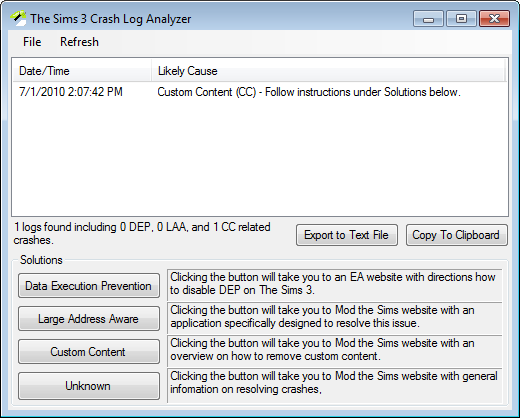
DasmX86Dll.dll is a diagnostic file used to disassemble the code so it is easier to process. It's nothing to be concerned about. Try removing all your custom content. That's the only INT_DIVIDE_BY_ZERO I've seen which means it isn't likely to be caused by the game or I'd have seen a lot more of them by now. |
|
|
|
28th Nov 2010, 02:30 AM
|
#302 |
|
ZombieRain
|
[UNKNOWN] 20-Nov-10 2:30:48 PM OS Version: 6.0.6000 TS3 Path: C:\Program Files\Electronic Arts\The Sims 3 Late Night\Game\Bin\TS3EP03.exe TS3 Version: 0.2.0.125 Installed RAM: 3.25 GiB TS3 Free VM: 1.17 GiB / 3.00 GiB Crash Type: ACCESS_VIOLATION reading address 0x79cc0778 Crash Address: 0x0046e4be "C:\Program Files\Electronic Arts\The Sims 3 Late Night\Game\Bin\TS3EP03.exe":0x0001:0x0006d4be [UNKNOWN] 20-Nov-10 3:53:23 PM OS Version: 6.0.6000 TS3 Path: C:\Program Files\Electronic Arts\The Sims 3 Late Night\Game\Bin\TS3EP03.exe TS3 Version: 0.2.0.125 Installed RAM: 3.25 GiB TS3 Free VM: 1001 MiB / 3.00 GiB Crash Type: ACCESS_VIOLATION writing address 0x88a90000 Crash Address: 0x00a981aa "C:\Program Files\Electronic Arts\The Sims 3 Late Night\Game\Bin\TS3EP03.exe":0x0001:0x006971aa [UNKNOWN] 20-Nov-10 9:45:39 PM OS Version: 6.0.6000 TS3 Path: C:\Program Files\Electronic Arts\The Sims 3 Late Night\Game\Bin\TS3EP03.exe TS3 Version: 0.2.0.125 Installed RAM: 3.25 GiB TS3 Free VM: 1.04 GiB / 3.00 GiB Crash Type: ACCESS_VIOLATION writing address 0x000407a6 Crash Address: 0x00a9957f "C:\Program Files\Electronic Arts\The Sims 3 Late Night\Game\Bin\TS3EP03.exe":0x0001:0x0069857f [UNKNOWN] 20-Nov-10 11:08:04 PM OS Version: 6.0.6000 TS3 Path: C:\Program Files\Electronic Arts\The Sims 3 Late Night\Game\Bin\TS3EP03.exe TS3 Version: 0.2.0.125 Installed RAM: 3.25 GiB TS3 Free VM: 1.24 GiB / 3.00 GiB Crash Type: ACCESS_VIOLATION writing address 0x000a5eac Crash Address: 0x00a902fb "C:\Program Files\Electronic Arts\The Sims 3 Late Night\Game\Bin\TS3EP03.exe":0x0001:0x0068f2fb [UNKNOWN] 27-Nov-10 7:23:40 PM OS Version: 6.0.6000 TS3 Path: C:\Program Files\Electronic Arts\The Sims 3 Late Night\Game\Bin\TS3EP03.exe TS3 Version: 0.2.0.125 Installed RAM: 3.25 GiB TS3 Free VM: 1.05 GiB / 3.00 GiB Crash Type: ACCESS_VIOLATION reading address 0x00000007 Crash Address: 0x00a93eb0 "C:\Program Files\Electronic Arts\The Sims 3 Late Night\Game\Bin\TS3EP03.exe":0x0001:0x00692eb0 I'm still going through the posts to see if anyone else has the same number crashes as me. What I'm confused about is that it's a different number each time. Is it cc? Thank you SO much for this tool by the way. It helped fix other crashes and so far this is the only one I haven't been able to fix myself. Thank you also for all the support. |
|
|
#303 |
| FordGT90Concept |
Playing the game without custom content is the first thing you should try. Seeing how your crashes are relatively close together, yet extremely varied, I wouldn't rule out hardware problems. |
|
|
|
5th Dec 2010, 03:15 AM
|
#304 |
|
ZombieRain
|
Well cleared out cc and ran without, still got a crash. I've noticed that it only crashes in build/buy mode, which would make me think cc. :/ This is with 6.1. I at least got a different crash lol. Is this a memory one? [UNKNOWN] 03-Dec-10 7:31:30 PM OS Version: 6.0.6000 TS3 Path: C:\Program Files\Electronic Arts\The Sims 3 Late Night\Game\Bin\TS3EP03.exe TS3 Version: 0.2.0.128 Installed RAM: 3.25 GiB TS3 Free VM: 732 MiB / 3.00 GiB Crash Type: STACK_OVERFLOW Crash Address: 0x735f4ef0 "C:\Windows\WinSxS\x86_microsoft.vc80.crt_1fc8b3b9a1e18e3b_8.0.50727.4927_none_d08a205e442db5b5\MSVCR80.dll":0x0001:0x00013ef0 Also, I have 4 gb of ram, do you know why it only sees 3? Is the other one maybe reserved for operating system or something? |
|
|
#305 |
| FordGT90Concept |
If you have Windows Vista 32-bit, it is likely to only go up to 3 GiB (IncreaseUserVA 3072). If Windows Vista 64-bit, it may have defaulted to 3 GiB because of only having 4 GiB of memory installed. I'm still thinking that is caused by hardware problems. If you want to test it... 1. OCCT to verify the CPU is good. Two hours is usually sufficient but if it lasts 4 hours without errors, it pretty much completely rules out the CPU. Note the max temperature. 2. FurMark to verify the GPU is good. Half an hour is sufficient but an hour is preferred. You'll want to look for anything out of the ordinary while the furry dounut is spinning like lines across the screen, splotches appearing, or anything else that looks odd. Again, note the max temperature before closing it. 3. memtest86+ to verify the RAM is good. Make sure it completes 1 pass but 3 is preferred. Note how many errors and ECC errors were caught before closing it. |
|
|
|
|
|
#306 |
| varpunen |
Okay, I get this message: "Large address aware/UserVA - Increase UserVA to 3072" What does it mean and how to correct that? Thanks. Here's some stats: [System info] CPU count: 2 Processor type: x86 Processor level: 6 Processor revision: 5898 Memory load: 72% Total physical memory: 3325 Mb Available physical memory: 906 Mb Total page file memory: 6878 Mb Available page file memory: 3105 Mb Total virtual memory: 2047 Mb Free virtual memory: 304 Mb [Exception info] date: 2010-12-06 time: 22.48.01 type: ACCESS_VIOLATION reading address 0x01a1847e address: 0x00cca892 "C:\Program Files\Electronic Arts\The Sims 3 Late Night\Game\Bin\TS3EP03.exe":0x0001:0x008c9892 |
|
"Every person should have their escape route planned." The Post-Apocalyptic World Community Project SmilingJack: "Blood! It's your new leg of lamb, your new champagne." Vampire: The Masquerade - Bloodlines World Project |
|
|
|
|
|
|
#307 |
| FordGT90Concept |
Follow the directions for your operating system here: http://www.simswiki.info/wiki.php?t...erating_Systems You'll want to go with the 4 GiB option. |
|
|
|
|
|
#308 |
| varpunen |
Alright, I'll do that. Thank you so much.
|
|
"Every person should have their escape route planned." The Post-Apocalyptic World Community Project SmilingJack: "Blood! It's your new leg of lamb, your new champagne." Vampire: The Masquerade - Bloodlines World Project |
|
|
|
|
|
|
#309 |
|
leiis2damnqt
Test Subject
Join Date: Sep 2010 |
Hi, I'm getting an absurd amount of crashes while I'm playing the game (the game crashes between 1-2 hours of playing). I have a iMac, and I'm not using your tool - I just don't know where else to go to for help. I have Base, WA I have CC (a selection of various things) & my game is patched to 2.13.6.009001 Processor Name: Intel Core 2 Duo Processor Architecture: ??? Graphics Processor: ATI Radeon HD 4670 [Build info] Application: Sims3 BuildTime: 2010-11-22-1441 BuildUser: codebuilder BuildHost: SIMS-BUILD144 BuildConfig: Release BuldVersion: 0.2.0.128 Commandline: C:\Program Files\Electronic Arts\The Sims 3 World Adventures\Game\Bin\TS3EP01.exe -f [System info] EA_PLATFORM: Windows on X86 OS name: Windows XP OS version number: 5.1.2600 OS service pack: Service Pack 2 Debugger present: no CPU count: 2 Processor type: x86 Processor level: 5 Processor revision: 5898 Memory load: 71% Total physical memory: 4106 Mb Available physical memory: 1161 Mb Total page file memory: 6154 Mb Available page file memory: 2341 Mb Total virtual memory: 2047 Mb Free virtual memory: 850 Mb [Application info] Language: C++ Compiler: Microsoft Visual C++ compiler, version 1400 App path: C:\Program Files\Electronic Arts\The Sims 3 World Adventures\Game\Bin\TS3EP01.exe App version: 0.2.0.128 [Exception info] date: 2010-12-06 time: 18.25.15 type: ACCESS_VIOLATION writing address 0x00000000 address: 0x707a7480 <unknown module> Thank you in advance for ANY help you can give me. |
|
|
|
|
|
#310 |
| FordGT90Concept |
Looks like that specific crash could be DEP related. More info here: http://www.simswiki.info/wiki.php?t...tion_Prevention Could you click on the Copy to Clipboard or Save to Text File option and paste the results in your reply. It consolidates the important information (custom content count, summary of crashes, expansions installed, version numbers, architecture, etc.). |
|
|
|
|
|
#311 | |
| Alundra |
Hey .I've spent the better part of two days using this and going through my custom content. Is there something I can do to figure out what file is causing my issues? None of the mod compatibility things came up with anything so I ended up updating everything and removing anything I barely used or could live without. I have no idea what caused the issue but I seem to have fixed it. I'm just curious because the log said this: Quote:
What's an access violation? Is there anything in particular which may cause it? Is there anything I can do to prevent it? Thanks in advance :D. | |
|
|
||
|
|
|
|
|
#312 |
| FordGT90Concept |
That is basically "error 7" and I think yours might be the first. An access violation means the application attempted to read from a memory address it doesn't have permission to read from. Could you post the entire summary by clicking on Copy BB Code or Save to Text File and pasting the contents in your reply? I can eliminate most causes except custom content that way. |
|
|
|
|
|
#313 |
| Alundra |
Alright .I'll attach all the logs, some of them have stack data and stuff which I didnt see until just now because the program said my issue was custom content....and I didnt know how to read the logs myself until last night lol. I'm also attaching the older ones (going back to July) because it seems this has been ongoing and I dont know if they hold any valuable information or not so I figured better to send you too much than too little since I'm trying to help :D. If you need anything else feel free to ask . I can give my CC lists too .P.S: I dunno why the logs are saying I'm running Vista, I'm running Windows 7 Home Premium 64 bit. |
|
|
|
|
|
Last edited by Alundra : 9th Dec 2010 at 09:52 AM.
|
|
|
#314 |
| FordGT90Concept |
I didn't want you to attach the logs. I need you to run CLA, click on the "Copy to Clipboard" button, and paste it in your reply. Logs do not include processor, processor architecture, graphics processor, a list of games installed, the version of each, the count of custom content, and types of errors specific to your system. CLA will parse all xcpt...txt in your Sims 3 directory. OS version number: 6.1.7600 is Windows 7. |
|
|
Last edited by FordGT90Concept : 9th Dec 2010 at 04:33 PM.
|
|
|
#315 |
| Alundra |
Oh, sorry I misunderstood .On the OS, the logs literally said "vista"....that's what I meant. Thanks again, sorry about the mix up. -------------------------------------------------------------------- Processor Name: Intel(R) Core(TM) i3 CPU M 350 @ 2.27GHz Processor Architecture: AMD64 Graphics Processor: Intel(R) HD Graphics Games Installed: The Sims™ 3 (1.18.9.009001), The Sims™ 3 World Adventures (2.13.6.009001), The Sims™ 3 Ambitions (4.6.6.009001) Custom Content: Yes (197 found) [WARNING CUSTOM CONTENT] 08-12-10 6:55:11 PM OS Version: 6.1.7600 TS3 Path: C:\Program Files (x86)\Electronic Arts\The Sims 3 Ambitions\Game\Bin\TS3EP02.exe TS3 Version: 0.2.0.128 Installed RAM: 2.87 GiB TS3 Free VM: 3.34 GiB / 4.00 GiB Crash Type: ACCESS_VIOLATION reading address 0x00000007 Crash Address: 0x00a946a0 "C:\Program Files (x86)\Electronic Arts\The Sims 3 Ambitions\Game\Bin\TS3EP02.exe":0x0001:0x006936a0 [WARNING CUSTOM CONTENT] 08-12-10 6:57:27 PM OS Version: 6.1.7600 TS3 Path: C:\Program Files (x86)\Electronic Arts\The Sims 3 Ambitions\Game\Bin\TS3EP02.exe TS3 Version: 0.2.0.128 Installed RAM: 2.87 GiB TS3 Free VM: 3.33 GiB / 4.00 GiB Crash Type: ACCESS_VIOLATION reading address 0x00000007 Crash Address: 0x00a945cb "C:\Program Files (x86)\Electronic Arts\The Sims 3 Ambitions\Game\Bin\TS3EP02.exe":0x0001:0x006935cb [WARNING CUSTOM CONTENT] 08-12-10 6:59:50 PM OS Version: 6.1.7600 TS3 Path: C:\Program Files (x86)\Electronic Arts\The Sims 3 Ambitions\Game\Bin\TS3EP02.exe TS3 Version: 0.2.0.128 Installed RAM: 2.87 GiB TS3 Free VM: 3.31 GiB / 4.00 GiB Crash Type: ACCESS_VIOLATION reading address 0x00000007 Crash Address: 0x00a945cb "C:\Program Files (x86)\Electronic Arts\The Sims 3 Ambitions\Game\Bin\TS3EP02.exe":0x0001:0x006935cb [WARNING CUSTOM CONTENT] 08-12-10 7:04:45 PM OS Version: 6.1.7600 TS3 Path: C:\Program Files (x86)\Electronic Arts\The Sims 3 Ambitions\Game\Bin\TS3EP02.exe TS3 Version: 0.2.0.128 Installed RAM: 2.87 GiB TS3 Free VM: 3.34 GiB / 4.00 GiB Crash Type: ACCESS_VIOLATION reading address 0x00000007 Crash Address: 0x00a945cb "C:\Program Files (x86)\Electronic Arts\The Sims 3 Ambitions\Game\Bin\TS3EP02.exe":0x0001:0x006935cb [WARNING CUSTOM CONTENT] 08-12-10 7:35:27 PM OS Version: 6.1.7600 TS3 Path: C:\Program Files (x86)\Electronic Arts\The Sims 3 Ambitions\Game\Bin\TS3EP02.exe TS3 Version: 0.2.0.128 Installed RAM: 2.87 GiB TS3 Free VM: 3.27 GiB / 4.00 GiB Crash Type: ACCESS_VIOLATION reading address 0x00000007 Crash Address: 0x00a945cb "C:\Program Files (x86)\Electronic Arts\The Sims 3 Ambitions\Game\Bin\TS3EP02.exe":0x0001:0x006935cb |
|
|
|
|
|
|
|
|
#316 |
| FordGT90Concept |
It might be a corrupt save but more likely, one of the custom content you have installed is incompatible corrupt/incompatible with the latest round of updates. The first thing I would try doing is removing all custom content to see if it fixes it. If not, try making a new neighborhood/save to eliminate a corrupt save as the cause. |
|
|
|
|
|
#317 |
|
kostako
Test Subject
Join Date: Dec 2010 |
Hi, is this thread still active? Been having huge issues with crashes under 5min. Exhausted all possibilities... Details here: http://www.modthesims.info/showthread.php?t=428187 Ran the crash log analyser and it's telling me I have "insufficient memory installed." [System info] EA_PLATFORM: Windows on X86 OS name: Windows XP OS version number: 5.1.2600 OS service pack: Service Pack 3 Debugger present: no CPU count: 2 Processor type: x86 Processor level: 15 Processor revision: 17155 Memory load: 60% Total physical memory: 2046 Mb Available physical memory: 817 Mb Total page file memory: 3938 Mb Available page file memory: 2952 Mb Total virtual memory: 2047 Mb Free virtual memory: 1119 Mb [Exception info] date: 2010-12-15 time: 20.21.08 type: ACCESS_VIOLATION reading address 0xd586a8d4 address: 0x009f2f1a "C:\Program Files\Electronic Arts\The Sims 3\Game\Bin\TS3.exe":0x0001:0x005f1f1a How can I have not enough memory installed when I had 817mb available on crash? |
|
|
|
|
|
#318 |
|
kostako
Test Subject
Join Date: Dec 2010 |
The crashes are all pretty much 5 or so minutes into the game. The last one I noticed it hung for a split second before it crashed, and only crashed when i clicked after the hang recovered. Really annoying that I can't even play the game as it is. I mean GTAIV runs ok on this thing, little slow but playable... Anyways, anything you could tell me would be much appreciated. Cheers. --------------------------------------------------------------------------- Processor Name: AMD Athlon(tm) 64 X2 Dual Core Processor 6000+ Processor Architecture: x86 Graphics Processor: NVIDIA GeForce 8600 GT Games Installed: The Sims™ 3 (1.0.631.00002) Custom Content: No [WARNING INSUFFICIENT MEMORY] 12/15/2010 7:49:40 PM OS Version: 5.1.2600 Installed RAM: 2.00 GiB TS3 Free VM: 1.12 GiB / 2.00 GiB Crash Type: ACCESS_VIOLATION writing address 0x0010a72f Crash Address: 0x0068b951 "C:\Program Files\Electronic Arts\The Sims 3\Game\Bin\TS3.exe":0x0001:0x0028a951 [WARNING INSUFFICIENT MEMORY] 12/15/2010 8:21:08 PM OS Version: 5.1.2600 Installed RAM: 2.00 GiB TS3 Free VM: 1.09 GiB / 2.00 GiB Crash Type: ACCESS_VIOLATION reading address 0xd586a8d4 Crash Address: 0x009f2f1a "C:\Program Files\Electronic Arts\The Sims 3\Game\Bin\TS3.exe":0x0001:0x005f1f1a [WARNING INSUFFICIENT MEMORY] 12/15/2010 8:49:01 PM OS Version: 5.1.2600 Installed RAM: 2.00 GiB TS3 Free VM: 1.05 GiB / 2.00 GiB Crash Type: ACCESS_VIOLATION reading address 0x00000014 Crash Address: 0x00b9ca36 "C:\Program Files\Electronic Arts\The Sims 3\Game\Bin\TS3.exe":0x0001:0x0079ba36 |
|
|
Last edited by kostako : 15th Dec 2010 at 09:53 AM.
Reason: correct wording
|
|
|
#319 |
| FordGT90Concept |
First, you need to get your game updated. You are running the very first release of the game. This will make the game current: http://akamai.cdn.ea.com/eadownload...9002_Update.exe Failing that, it looks to me like you need more RAM. There's not enough memory installed to run Windows, your side programs, and The Sims 3. The Sims 3, by itself, can use over 2 GiB of RAM. You only have 2 GiB total installed, unfortunately. I would highly recommend upgrading your computer's RAM to 4 GiB total. |
|
|
|
|
|
#320 |
| Mehrlicht |
Hi FordGT,Today no crash...Just some news.After some hesitations I thought I had to inform you : Last week my computer guy made a complete check up and found out that my harddrive was no more good ....Well, I had to buy a new one and have now Windows 7 - 64 - with 8 GB of ram. Then I have played and played...The game works like a charm ! I didn't experience such a happiness since "Ambitions".While I always launched the game with pounding heart,I feel now secure and enjoy it deeply. Maybe the crashes were caused by this harddrive failure.I wonder if it could be possible to connect the previous errors with this hardware problem ( all other components were OK). Besides I have the impression that 8 gb ram instead of 4gb help a lot.The loading time has decreased. Thanks for all your precious help (and for the patch Downloader too)
|
|
|
|
|
|
#321 |
| FordGT90Concept |
That is helpful. It might mean 0x24 and/or 0x14 are read/write errors on the hard drive. You were the only one to experience those errors. I have made note of this in my documentation. Thanks again. |
|
|
|
|
|
#322 | |
| Alundra |
Quote:
Thanks for your advice :D. I think it may have been a corrupt save AND custom content because it was happening until I removed my saves. Thanks for the tool too, it's very helpful :D. | |
|
|
||
|
|
|
|
|
#323 |
| FordGT90Concept |
Thanks for letting me know. I have made note of this and may add it to CLA. Thanks again. |
|
|
|
|
|
#324 |
| Alundra |
If you want more info: I updated all of my mods and it prevented it happening a few seconds into the game, but it still happened and my sim was buggy so when I deleted the save game and made a new one I noticed it stopped happening. I think outdated CC exaggerated the problem the save game was causing. I still don't know why the save went bad though. |
|
|
|
|
|
|
|
|
#325 |
| FordGT90Concept |
There's a least a dozen reasons why a save might be corrupted from custom content error, to a change between patches, to an error in the saving code, to hard drive failure, to memory failure, etc. Odds are, it will happen to someone at some point or another. |
|
|
|

Add To Favourites
Download


28th Nov 2010, 02:30 AM

Twitter
del.icio.us
StumbleUpon
Google