
 Sign in to Mod The Sims
 Bella's Wedding Gown
 Bella's Wedding Gown
MTS has all free content, all the time. Donate to help keep it running.
SCREENSHOTS
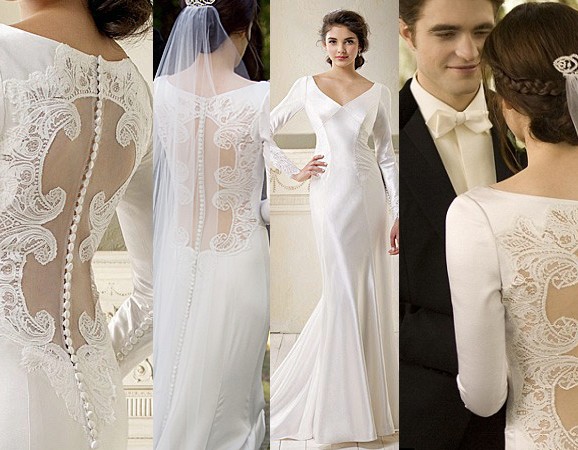
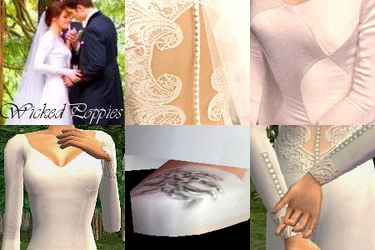
nov11Wedding-dress-Bella-swan-twilight.jpg - width=578 height=450
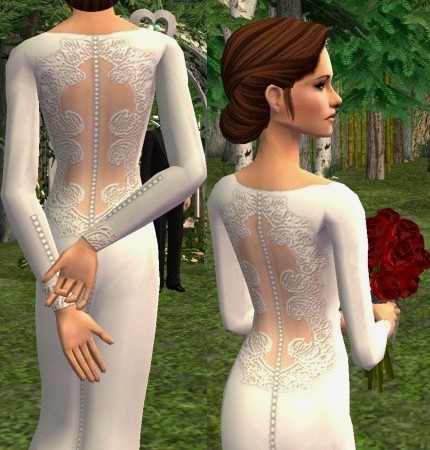
snapshot_fc6a7345_5c6a774b.jpg - width=430 height=450
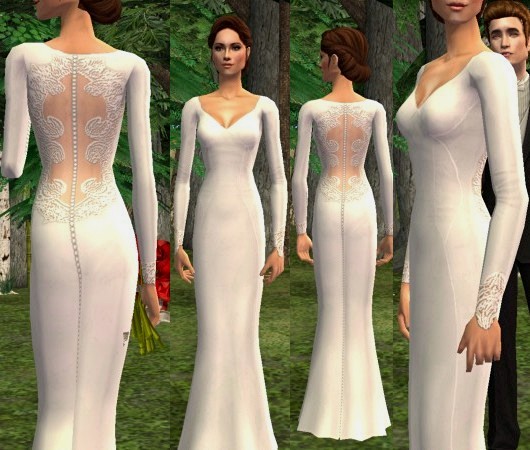
snapshot_fc6a7345_7c6a7c06.jpg - width=530 height=450
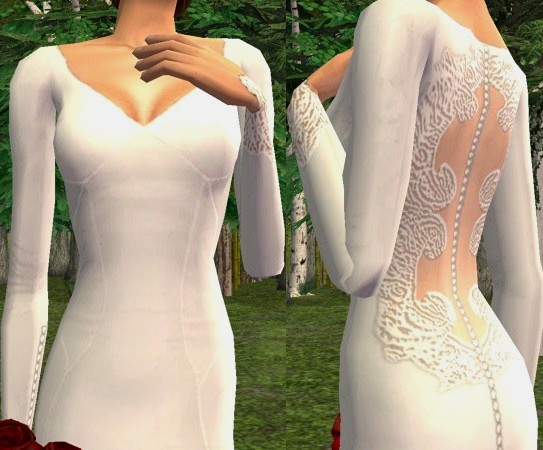
snapshot_fc6a7345_dc6a7a45.jpg - width=543 height=450
Picked Upload!
This is a picked upload! It showcases some of the best talent and creativity available on MTS and in the community.

Uploaded: 14th Mar 2012 at 1:04 AM
Updated: 16th Mar 2012 at 2:39 PM
Updated: 16th Mar 2012 at 2:39 PM
I’m not dead, in case anyone wondered. To be honest, I’ve just been too busy and Lazy to upload anything. However, I return today with a small gift for you guys. For some reason I’ve been rather obsessed lately with recreating real dresses I like, and so I thought I would share one of them with you today.
I’ve done my best to faithfully re-create the custom wedding gown Bella wore in Breaking Dawn Part 1. The dress was designed specifically for the film by Carolina Herrera, a well-known fashion designer. Also created for the film where Bella’s pumps by Manolo Blahnik. Herrera and Blahnik collaborated to make sure the shoes and the dress both had a vintage look to them, while not coming off as dated.
I loved everything about her wedding look, from her hair and make-up to the shoes and dress. I especially love the back of the gown, although it was a pain in the ass to try and recreate.
The dress uses a base game mesh, so you just need my re-texture, and you’re good to go. The model in the pictures is my own Bella sim. However, please do not ask me to upload her, because she is derived from Vera Marina’s Bella that is no longer available for download here. The hair “Bella” is wearing is by Helga, and recolored by Dustfinger, and can be downloaded here. “Edward’s” hair is a sims 3 conversion by Lina, and can be downloaded here. Thanks, and enjoy! I would love to see it if you use it in stories, videos and pics!!!
I’ve done my best to faithfully re-create the custom wedding gown Bella wore in Breaking Dawn Part 1. The dress was designed specifically for the film by Carolina Herrera, a well-known fashion designer. Also created for the film where Bella’s pumps by Manolo Blahnik. Herrera and Blahnik collaborated to make sure the shoes and the dress both had a vintage look to them, while not coming off as dated.
I loved everything about her wedding look, from her hair and make-up to the shoes and dress. I especially love the back of the gown, although it was a pain in the ass to try and recreate.
The dress uses a base game mesh, so you just need my re-texture, and you’re good to go. The model in the pictures is my own Bella sim. However, please do not ask me to upload her, because she is derived from Vera Marina’s Bella that is no longer available for download here. The hair “Bella” is wearing is by Helga, and recolored by Dustfinger, and can be downloaded here. “Edward’s” hair is a sims 3 conversion by Lina, and can be downloaded here. Thanks, and enjoy! I would love to see it if you use it in stories, videos and pics!!!
This is a Maxis Recolour which means that it is a recolour of an item that already exists in your game. Please check the Pack requirements to see which game pack it recolours.
| Filename | Size | Downloads | Date | |||||
|
BreakingDawnDress_WP.zip
Size: 199.2 KB · Downloads: 51,135 · 16th Mar 2012 |
199.2 KB | 51,135 | 16th Mar 2012 | |||||
| For a detailed look at individual files, see the Information tab. | ||||||||
Key:
- - File was updated after upload was posted
Install Instructions
Basic Download and Install Instructions:
1. Download: Click the download link to save the .rar or .zip file(s) to your computer.
2. Extract the zip, rar, or 7z file.
3. Place in Downloads Folder: Cut and paste the .package file(s) into your Downloads folder:
1. Download: Click the download link to save the .rar or .zip file(s) to your computer.
2. Extract the zip, rar, or 7z file.
3. Place in Downloads Folder: Cut and paste the .package file(s) into your Downloads folder:
- Origin (Ultimate Collection): Users\(Current User Account)\Documents\EA Games\The Sims™ 2 Ultimate Collection\Downloads\
- Non-Origin, Windows Vista/7/8/10: Users\(Current User Account)\Documents\EA Games\The Sims 2\Downloads\
- Non-Origin, Windows XP: Documents and Settings\(Current User Account)\My Documents\EA Games\The Sims 2\Downloads\
- Mac: Users\(Current User Account)\Documents\EA Games\The Sims 2\Downloads
- Mac x64: /Library/Containers/com.aspyr.sims2.appstore/Data/Library/Application Support/Aspyr/The Sims 2/Downloads
- For a full, complete guide to downloading complete with pictures and more information, see: Game Help: Downloading for Fracking Idiots.
- Custom content not showing up in the game? See: Game Help: Getting Custom Content to Show Up.
- If you don't have a Downloads folder, just make one. See instructions at: Game Help: No Downloads Folder.
Also Thanked - Users who thanked this download also thanked:
by fakepeeps7
Packs Needed
None, this is Sims 2 base game compatible!
Other Information
Age:
– Adult
Gender:
– Female
Clothing Type:
– Formal
Clothing Style:
– Modern
– Historial
: Historically accurate
– Fantasy
: Fantasy themed
Other Type:
– Not Applicable
Maxis Flags:
– Not Applicable
Outfit Type:
– Full Outfit
Tags
About Me
My policy is simple. Do whatever you want with my stuff. However please respect me enough to give me credit for any of my work that you use. As long as you give me credit, I don’t give a crap what you do with my creations. Go nuts! LOL
Also I DO NOT take requests.
Also I DO NOT take requests.
More Downloads BETA
Here are some more of my downloads: